🔗 在 Linux 网桥服务器上代理 Web 流量
🔗 目录
本示例概述了如何配置 Linux 网桥将流量(在本例中为 Web 流量)策略路由到 Squid 代理。
请注意,这只是将数据包从网桥模式(OSI 模型第 2 层数据包处理)移至计算机的数据包路由系统(第 3 层);您还必须配置计算机上的路由(第 3 层)和拦截(第 4 层)才能将流量导向 Squid TCP 端口!
🔗 用法
各种网络正在使用网桥设备作为网关,并希望实现透明缓存或内容过滤。
🔗 ebtables DROP 与 iptables DROP
在 iptables 中,在大多数情况下用于过滤网络流量的 DROP 目标表示“数据包消失”。
在 ebtables 中,“-j redirect –redirect-target DROP”表示“数据包从网桥消失,进入内核的上层,例如路由/转发”
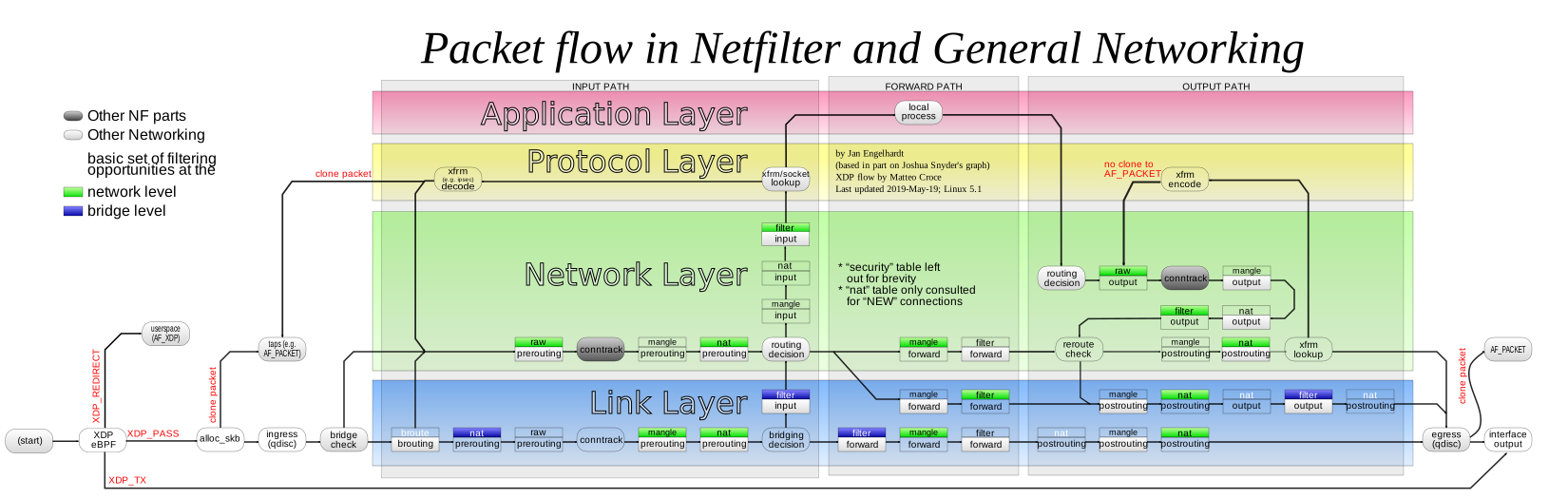
由于 ebtables 工作在连接的链路层,为了拦截连接,我们必须将流量“重定向”到 iptables 能够拦截/代理的级别。
一张 netfilter 流程图以说明
🔗 ebtables 配置规则
Linux 中的网桥配置是通过 ebtables 工具完成的。
您还需要按照所有步骤将 Squid 服务器设置为路由器设备。这些网桥规则是用于将数据包从网桥模式移至路由模式的附加步骤: ```bash ## 面向客户端的接口 CLIENT_IFACE=eth0
## interface facing Internet
INET_IFACE=eth1


ebtables -t broute -A BROUTING \
        -i $CLIENT_IFACE -p ipv6 --ip6-proto tcp --ip6-dport 80 \
        -j redirect --redirect-target DROP

ebtables -t broute -A BROUTING \
        -i $CLIENT_IFACE -p ipv4 --ip-proto tcp --ip-dport 80 \
        -j redirect --redirect-target DROP

ebtables -t broute -A BROUTING \
        -i $INET_IFACE -p ipv6 --ip6-proto tcp --ip6-sport 80 \
        -j redirect --redirect-target DROP

ebtables -t broute -A BROUTING \
        -i $INET_IFACE -p ipv4 --ip-proto tcp --ip-sport 80 \
        -j redirect --redirect-target DROP


if test -d /proc/sys/net/bridge/ ; then
  for i in /proc/sys/net/bridge/*
  do
    echo 0 > $i
  done
  unset i
fi
网桥接口还需要配置公共 IP 地址,供 Squid 在其正常运行流量(DNS、ICMP、TPROXY 失败请求、对等方请求等)中使用。
⚠️ Disclaimer: Any example presented here is provided "as-is" with no support
or guarantee of suitability. If you have any further questions about
these examples please email the squid-users mailing list.
类别: ConfigExample
导航:站点搜索、站点页面、分类、🔼 向上