🔗 使用 REDIRECT 进行 Linux 流量拦截
🔗 目录
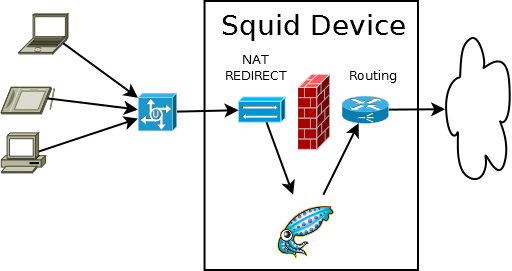
无需任何客户端配置即可透明地拦截 Web 请求。当 Web 流量到达运行 Squid 的机器时。
NAT配置仅在在squid盒子上使用时才有效。这是准确和安全地执行拦截所必需的。要从网关机拦截并将流量指向单独的squid盒,请使用策略路由。
🔗 iptables 配置
将 SQUIDIP 替换为 Squid 可用于其监听端口和出站连接的公共 IP。将 SQUIDPORT 替换为 squid.conf 中设置为 intercept 标志的端口。
由于 NAT 安全漏洞,**强烈建议**阻止对内部接收端口的外部访问。这必须在 NAT 发生之前的 iptables 的 mangle 部分完成,以避免拦截的流量被丢弃。
如果没有将这里的第一个 iptables 行放在最前面,您的设置可能会遇到转发循环问题。
# your proxy IP
SQUIDIP=192.168.0.2

# your proxy listening port
SQUIDPORT=3129


iptables -t nat -A PREROUTING -s $SQUIDIP -p tcp --dport 80 -j ACCEPT
iptables -t nat -A PREROUTING -p tcp --dport 80 -j REDIRECT --to-port $SQUIDPORT
iptables -t nat -A POSTROUTING -j MASQUERADE
iptables -t mangle -A PREROUTING -p tcp --dport $SQUIDPORT -j DROP
🔗 Squid 配置文件
您需要像这样配置 Squid 以便它知道 IP 地址正在被拦截:
http_port 3129 transparent
在 Squid 3.1+ 中,transparent 选项已被拆分。使用 ‘intercept 来捕获 REDIRECT 数据包。
http_port 3129 intercept
⚠️ Disclaimer: Any example presented here is provided "as-is" with no support
or guarantee of suitability. If you have any further questions about
these examples please email the squid-users mailing list.
类别: ConfigExample
导航:站点搜索、站点页面、分类、🔼 向上